Where is the budget actually going?
Engineering is your largest line item, and you're inferring its shape from ticket states. You can name every cloud cost to the dollar — but not how your engineering weeks are actually spent.
AI engineering telemetry
Your engineers now work alongside Claude Code, Codex and Cursor agents. More code ships than ever, the AI bill keeps growing — and when the board asks what it bought, you have a Jira board and a feeling. 3an.ai measures human hours and AI hours across every one of those tools, and lines them up with the commits and PRs they produced.
GitHub shows what changed. Jira shows what people claimed. 3an.ai shows how the work actually happened.
Free for up to 3 contributors · 14-day trial for bigger teams · no card required · sign in with Google
By continuing you agree to the Terms of Service and Data Processing Agreement on behalf of your organization. Privacy
Software is now built by humans and AI working together — in editors, agent sessions, and terminals your management stack has never seen. Commit counts show leftovers. Standups show what people remember. The how is invisible — and in the AI era, the how is where the money is.
Engineering is your largest line item, and you're inferring its shape from ticket states. You can name every cloud cost to the dollar — but not how your engineering weeks are actually spent.
More code is shipping. So is more churn, more review burden, more token burn. Without human and AI work side by side, "AI productivity" is an opinion, not a number.
Some teams run agents in parallel all day. Some have licenses. From the org chart they look identical — until you can see AI hours, sessions, and tokens per team. "The developers seem to like it" is not a slide.
Long stretches of work with few commits. PRs that wait days to merge. Heavy churn for little output. The activity record shows it — your ticket tracker doesn't, because nobody files a ticket called "I rewrote the same file four times."
Right now, the most AI-leveraged era in the history of software is being managed with Jira theater, GitHub leftovers, and vibes. You'd never run sales or infrastructure this way. You are flying blind — not because leadership is careless, but because the instruments didn't exist.
3an.ai captures the actual texture of engineering work — in the editor, in AI sessions, in Git, and across the desktop — and turns it into an executive dashboard.
Works with: VS Code · Cursor · VSCodium · Windsurf · Claude Code · Codex · Cursor Composer/Agent · any Git host · GitHub pull requests · macOS 13+ desktop app. Not yet: JetBrains IDEs, GitHub Copilot, Windows/Linux desktop app, GitLab/Bitbucket pull requests, Firefox.
Each contributor gets a personal ingest token — create users and email setup instructions in one click. No contributor sign-in required.
The extension and desktop agent stream activity in the background. Nothing to start, tag, or remember — and autofetch noise is filtered out by design, so only real activity counts.
Team overview, per-contributor drill-downs, AI session transcripts, Git flow, GitHub PR throughput, and system-wide focus — filterable by team and date range, minutes after the work happens.
Editor activity — typing, selections, focus, file switches — plus the text of each edit and its file path, straight from the editor where the work happens. One setting to configure: paste the token.
The same extension runs natively in Cursor (and VSCodium, Windsurf) via Open VSX — and it reads Cursor's own Composer and Agent sessions directly, so Cursor AI work shows up as first-class sessions, not a blind spot.
Full session capture for Claude Code / CLI and Codex: prompts, responses, tool calls, message counts, tokens in and out — every session badged by source. Claude Desktop registers as a presence signal: timestamps only, never chat content.
Commits, branch switches, merges, and rebases with per-commit lines added and removed — commit metadata from every repository in the home folder, never diffs. Read from local Git itself, so it works with any host, needs no webhooks, and the desktop app catches commits made from the terminal.
Connect a read-only GitHub App — pull requests and repo metadata, nothing else — and the leaderboard gains PRs opened, PRs merged, average time to merge, and reviews per contributor. You choose the repositories; GitHub usernames map to contributors once, in Manage users.
An optional, notarized, self-updating menu-bar app (macOS 13+) for work outside the editor: keyboard and mouse intensity (counts only — never which keys), the app in front, Git commits and AI sessions even when no editor is open. App time counts only while someone is at the Mac. Deploys by hand or by MDM with a ready-made permissions profile.
The desktop app reads the active tab in Chrome, Safari, Arc, Edge, Brave, Vivaldi, and Opera (not Firefox) after a one-time macOS permission per browser. Domains only by default — page titles and full URLs only if your org turns them on. Nothing to install in the browser.
Editor-only tools see a fraction of the day. Git-only tools see the aftermath. 3an.ai sees the work.
Measured activity, defined precisely — because a metric you can't explain to the board is a metric you can't defend. Hours on 3an.ai are activity-based: a five-minute slot counts as human time if it holds editor activity, a Git action or keyboard/mouse input, and as AI time once for each agent session active in it. Total hours = human + AI — a capacity number that can exceed the hours in a day. No timers, no screen time.
Every five-minute slot is classified: human work (editor activity, Git, real keyboard and mouse input) and AI work (active agent sessions). AI hours are agent-time — four parallel sessions in one slot count four, because that's the capacity you are actually deploying.
AI hours over human hours — context most leaders have never seen for their own org, never a score. Filter by team to see which teams changed how they work and which just have licenses.
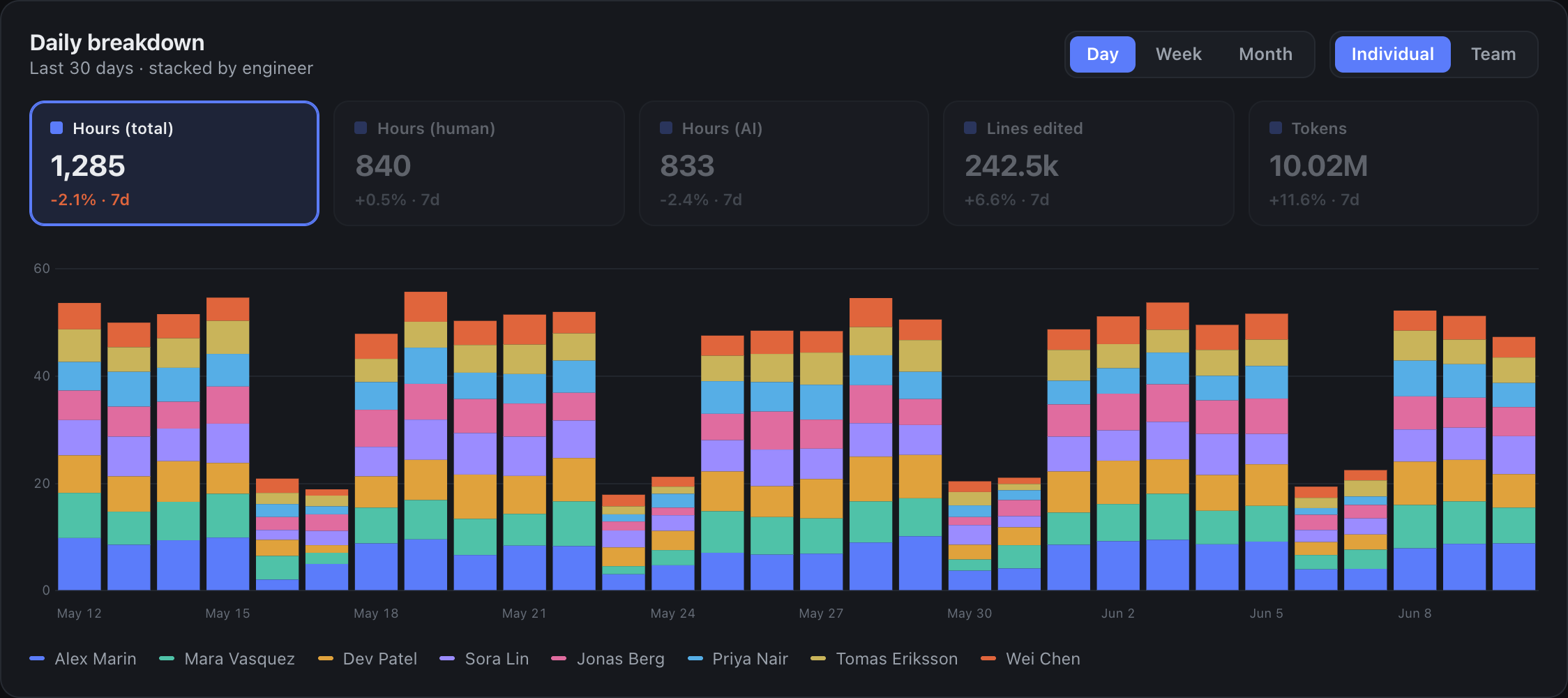
Daily, weekly, and monthly trends per contributor or whole team — hours, lines, tokens, commits and PRs — with 7-day momentum on the daily view, so you see direction, not just position.
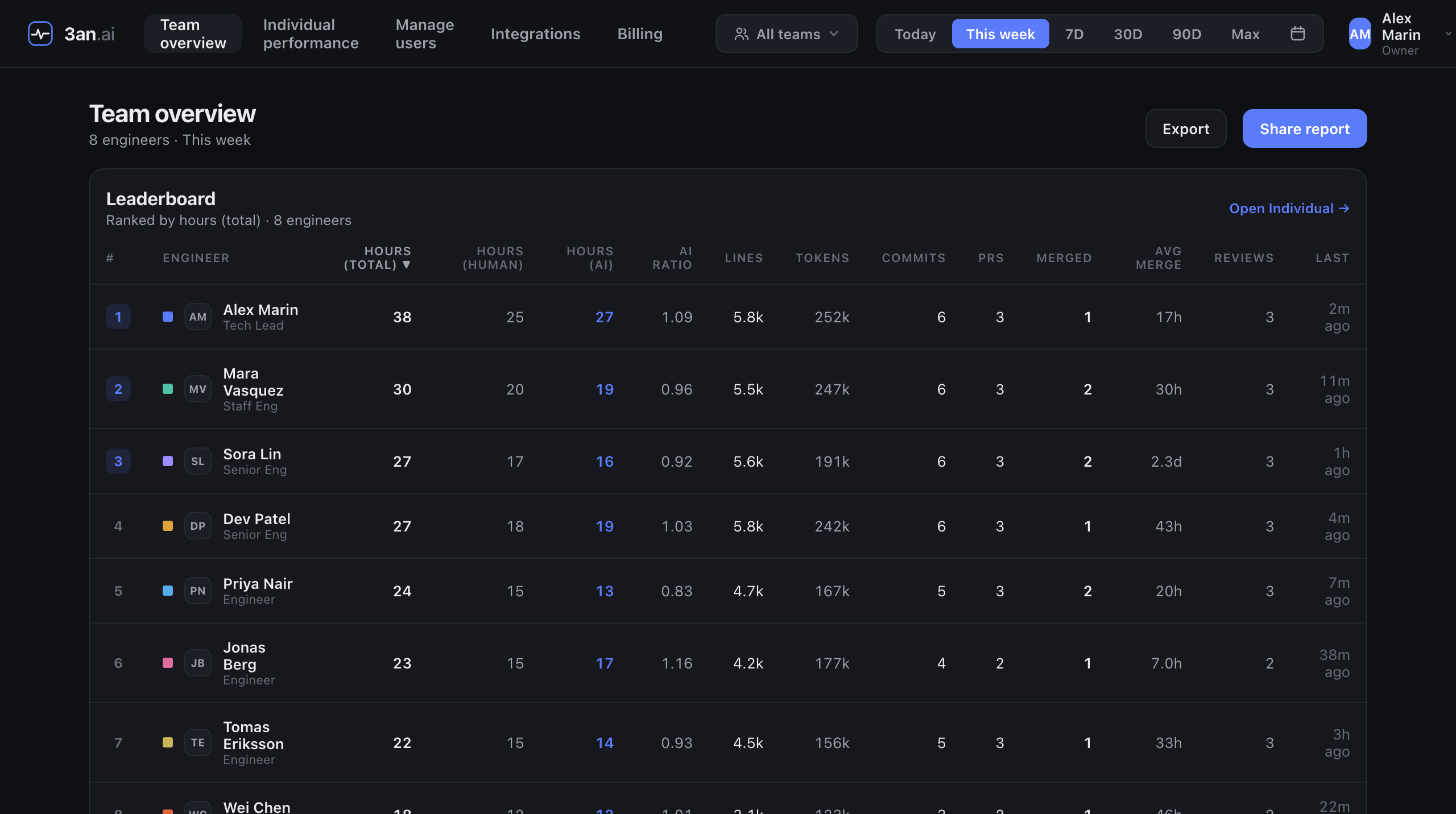
Team and contributor totals side by side: hours (total, human, AI), AI ratio, lines edited, tokens, commits — and with GitHub connected, PRs opened, merged, time to merge, and reviews. Sortable, filterable by team, exportable to CSV, one click from any row to the full individual picture.
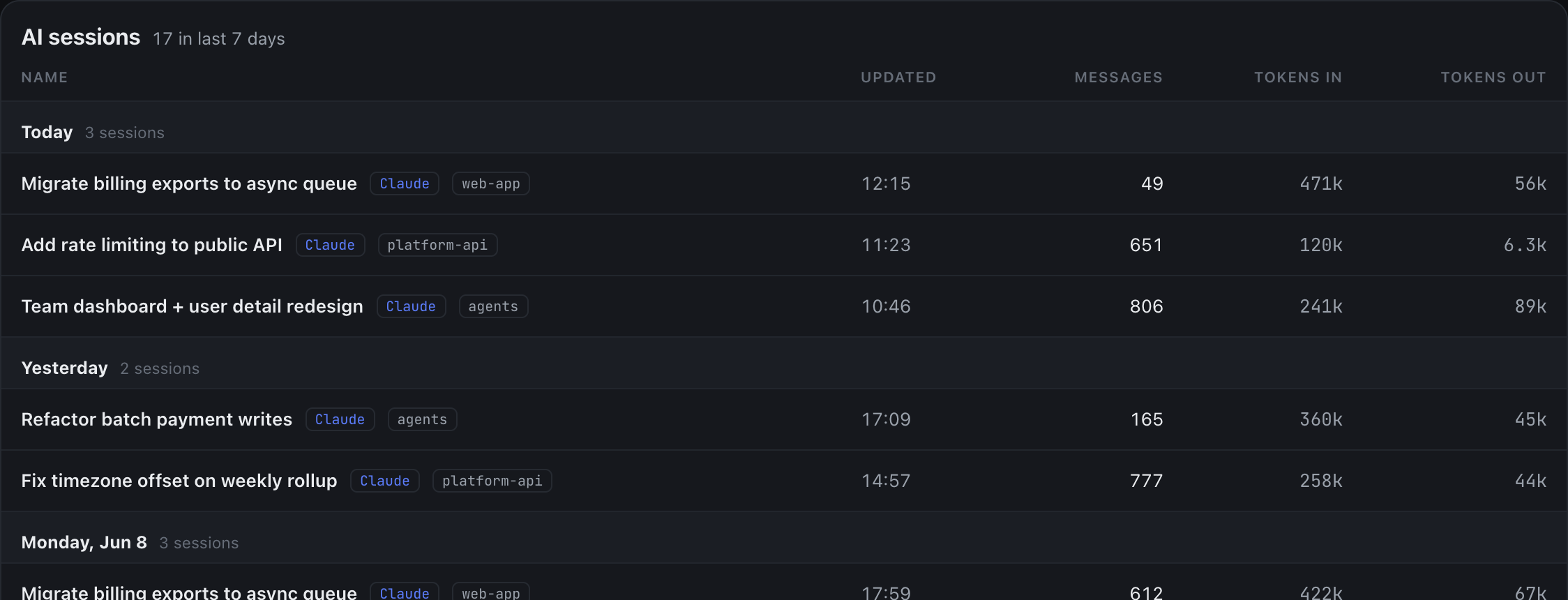
Every Claude, Cursor, and Codex session: title, project, message count, tokens in and out — and the full transcript, tool calls included. Admin-visible by design and disclosed as such; see the trust section for where the lines are.
Per-repo activity with commit subjects, branch switches, and per-commit line stats. Lines edited is honest raw churn — adds plus removes — so heavy rework is visible instead of flattering.
With GitHub connected: PRs opened, PRs merged, and average open-to-merge time in the selected window, plus distinct PRs reviewed. Self-reviews excluded, bots ignored, and closed-without-merge counted separately — not dressed up as shipped work.
Company-wide and per-contributor Mon–Sun heatmaps at 15-minute resolution, with peak-hour callouts. The weekly shape of your org's work, at a glance.
Top apps and top sites per contributor, plus keys, clicks, and active minutes from the desktop agent — the part of the workday no editor plugin has ever seen.
What we won't pretend to measure: we don't turn token counts into invented dollar figures, we don't score code quality from line counts, and hours are activity slots — not surveillance timers or screen recordings. Fewer numbers you can trust beats a wall of theater.
You sign the bill for engineering — and for AI tooling on top of it. Get a defensible answer to "is it working": adoption, hours, and output in one view, instead of a translated summary of a summary.
You're accountable for the engineering system, not individual heroics. See whether AI adoption is real or nominal, which teams have changed how they work, and where the activity says the system is jammed.
Skip the archaeology before every 1:1. Each contributor's week — human work, AI sessions, Git activity, focus — in one drill-down. Context for coaching, not a stick for compliance.
You rolled out the AI tooling. Now show the receipts: sessions, tokens, AI hours, and adoption curves per team — the evidence layer for every tooling decision you'll make next year.
3an.ai is not spyware, and we refuse to market it like spyware. It is engineering telemetry your company licenses — disclosed to the team, configured deliberately, and pointed at the system, not used to ambush individuals.
Here is the honest version. Inside the editor it records activity and the text of each edit, with file paths; full AI session transcripts, including the prompts typed into those tools, visible to your org's admins; Git activity — commits with subjects, authors and line counts, plus checkouts, merges and the like; never diffs — from every repository on the machine, including recent history when a machine is first connected; GitHub PR metadata if you connect it; and, through the optional macOS app, the app and site in front and keyboard/mouse counts. That is real visibility, and it should be deployed as such: tell your team it's running. We build on the assumption that you will. The full list is here.
System-wide keyboard and mouse capture is counts-only by construction — the desktop app records that keys were pressed, never which ones. The exceptions are deliberate and listed: prompts typed into an AI coding tool are part of its transcript, and commit messages are part of the commit.
Browser visibility records the bare domain. Page and window titles and full URLs are recorded only if your org's owner turns them on. Both settings are enforced on our server at ingest — not in a client setting someone can bypass.
Adult sites are dropped before they're stored — never recorded, flagged or counted. YouTube visits and titles are never recorded, the lock screen never counts as app time, and app time stops when the Mac sleeps, locks or sits idle.
Hours are derived from five-minute activity slots, not from watching screens or clocking seconds. Claude Desktop usage is a timestamp, never chat content.
Each organization's data is isolated in the database with row-level security and stored on Google Cloud in Belgium. Contributor tokens can be regenerated any time, and removing a contributor deletes their activity records and stored transcripts.
Surveillance asks "who's slacking." Telemetry asks "is the system working." We built the second one — and wrote this page so you can defend the difference to your own team.
Per contributor, in USD (excl. tax). Free for up to 3 contributors. Bigger teams get a 14-day trial of everything, and the clock starts when your first engineer connects. No card required. If you add one during the trial and still have more than 3 contributors when it ends, it is charged automatically unless you cancel first.
Free forever · no card
Billed monthly · cancel any time
$71.88 per contributor, billed annually
In your own Google Cloud project · 2-year minimum
By continuing you agree to the Terms of Service and Data Processing Agreement on behalf of your organization. Privacy
Humans aren't going anywhere — but the way they work has already changed, and your dashboards haven't noticed. Every quarter without real telemetry is another quarter of AI budget justified by anecdote. Sign in with Google and watch the first real picture of your org assemble itself today.
Your workspace is ready in seconds; your team's first activity appears minutes after they install. Questions: info@3an.ai
By continuing you agree to the Terms of Service and Data Processing Agreement on behalf of your organization. Privacy